Github repo for batch layer can be found here and for speed layer can be found here.
Let's get started
Design of the pipeline
The pipeline has a lambda architecture, with batch layer populating the serving layer with movies in one go, and then speed layer populating the serving layer daily with new movies. It looks something like

For batch layer i am using a script that pulls data from Wikidata and IMDBPy, then creates recommendations and pushes data to CosmosDB. For Speed layer i am using Azure functions that uses Azure Grid trigger, that is fired when a new movie comes in and invokes the azure function. Finally, recommendations can be viewed from CosmosDB for a partiular movie.
Recommendations and Graph Database
How do we determine which movies are similar to the others and how would we go about storing them in a graph database?
To determine which movies are similar to the others, i am using cosine similarity between plot of one movie with another. First, i take the plot of the movie, then i convert it to tokens using NLTK word tokenizer (I will explain how do i get the movie and plot data in the next section). Then, i extract POS tags of tokens. After that, i perform lemmitization, and then i remove stop words. After this is done, i calculate the term frequency and inverse document frequency, and then the plot are represented as vectors in geometric space. To determine the similarity between plots of two movies, i get the angle between vectors of plots.
To get the recommended movies for a particular movie, i can use the following
Now, i have the recommended movies based on a particular movie. How do i store them in graph database?
Graph database consists of
- a node (or a vertex) and
- an edge between two vertices.
A vertex can have properties. In our case, a vertex can be a movie, which can have properties like plot, year released etc. It can be connected to another movie (vertex) through an edge, and that edge can have a weight. This represenation of a graph database allows us to store movies in a simple format. A movie can be a vertex, with properties like name and plot, and it can be connected to other movies that are recommended by it (or are it’s recommendations) by an edge. The similarity between two movies can be the weight of the edge. It will look like the following (Azure CosmosDB).

Now that we know how do we determine similar movies, and how do we store them in graph database, we can design our pipeline.
Batch Layer (Wikidata, Gremlin and GraphDB)
In batch layer, i will grab the names of movies and their plots, determine similar movies, save them in graph database and create connections between related movies.
First, i get list of all the movies in a given time frame from Wikidata. It provides a SPARQL interface to provide data. The query is
Main concept behind SPARQL query is instances and class. Here, P31 is instance of, and Q11424 is film class. So, the query translates to select all instances of films in the year 2017. You can read more about sparql here.
Now that i have the movie names, i will get the plot of each movie which will be used to determine the similar movies. I will use IMDBPy, a python library that scrapes data from IMDB. The line
gets the plot of the movie. Once i have the plot of all the movies i determine similar movies as explained in the section above. Now, once i have the recommended movies for each movie, i will save them in the graph database.
The gremlin query to save data is
This query will add a vertex with label ‘movie’, which has a property id (i appended a random integer with the movie name to be used as id, as movie names can be similar), name and plot. The pk property is partition key.
Once the movies have been inserted, i then create connections between them. To do so, i first determine if there is already and existing edge between two movies, using
If there exists a connection between these two movies, that means we can move on, if there’s no connection, i create one, using
Now, our batch layer is ready.
Speed Layer (Azure Event Grid, Functions and DevOps)
Our speed layer is serverless. I used azure functions to push new movies to database. Azure functions are serverless constructs that wake up when a certain condition is met, like execution at a certain time (time trigger), when a web page is visited (http trigger) etc. I used event grid trigger, which means whenever data is pushed to an event grid topic, azure functions will wake up and execute. Azure event grid is similar to azure event hubs, except that event grid publishes changes that we subscribe to.
You might be wondering why are we using azure event grid to pull new items when we can just pull data from a python script based on a timer trigger. The reason is scalability. If we have a very high throughput input source, we can scale azure event grid accordingly.
I also deployed the code to Azure DevOps, so that CI/CD is set up.
I will start with how to create an azure funciton.
First, we create an azure function app. Search for Azure functions in azure portal, and click on Add, select serverless in Hosting (region western europe) and create.
Now, go to dev.azure.com and create a repository, and clone it into the local system. Open visual studio code, and install azure functions extension. Then, sign into the azure from visual studio code. Then, create a new project by clicking the ‘create new project’ icon above functions window.

Select the folder that you cloned from dev.azure.com, then select python, then select interpreter, then select Event Grid trigger, give a name to the trigger (i named it MovieTrigger3), and it will create the azure function.
Once that is done, click on ‘‘Deploy to function app’’ button next to ‘create new project’.

The function has been deployed to function app. Now go to files tab in visual studio code, you will see a folder by the name of the azure function (in my case, MovieTrigger3) and then go to __init__.py.
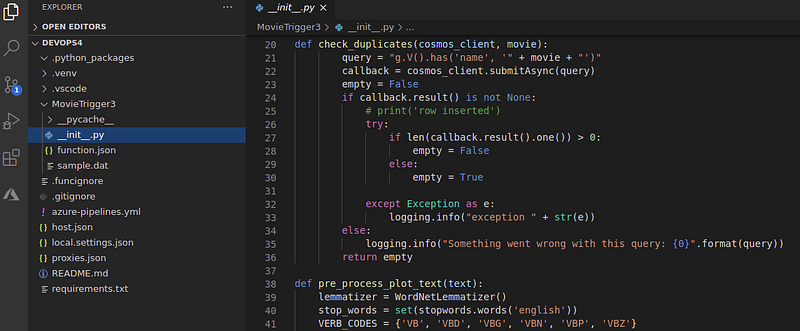
That is the file where we will write the code to push data to database.
Now that we have azure funciton ready, we will create an event grid topic.
In azure portal, search for event grid topics, then select add
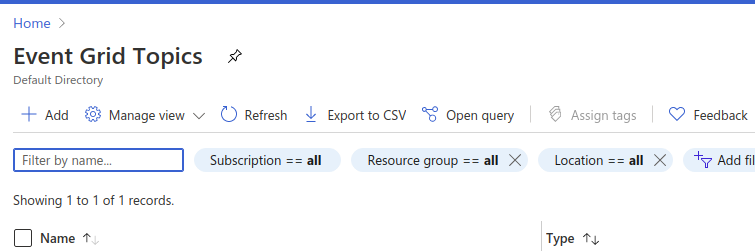
Fill in the required details, then create the topic. Once the topic has been created, we create a subscription. Click on the topic name, and then click on Event Subscription. Fill in the name, select endpoint type as “Azure function”, and then select endpoint as the function that you just created.
At this point we have our topic and azure function set up, and we have a subscription from the function to the event grid topic. If we publish data to the topic, azure function will wake up and process that data. What we need now is a script that publishes data to the topic.
The code that does that is
The function build_events_list() builds a list that has new movies, and run_example() publishes that data to the topic.
Once this is setup, we can go and write the code for our speed layer, which is as follows.
The code gets the movie name, then it checks if the database already contains that movie or not, if it does not, it gets the plot of the movie, and gets existing data from the database. After getting these two datasets, it concatenates them and determines the cosine similarity of the current movie with other movies. When that is done, the movie is inserted into the database, and edges are created between the movie and recommended movies.
Also, commit the code to the dev ops repo that was created earlier. It will automatically build and deploy the pipeline.
We can build a docker image for our code and host it on Azure container service, from where we can pull the image and deploy a deployment on Azure kubernetes service.
Getting recommendations
Now that we have data in our graph database, we can get recommendations as follows
The query searches for a vertex that has name as that of movie name passed in the arguments, and then it selects both the incoming and outgoing edges from that vertex.
Conclusion
In this post we went through how to create recommendation engines using cosine similarity, batch layer of the lambda architecture that saves all the data in one go in the database, and a serverless speed layer that pull new data daily, determines recommended movies and pushes that to database. Also, the design is not complete. In the current design, existing movies will create new connections indefinitely, this can be pruned to keep only the most relevant items as connections.
All of this has been done on azure stack, where most technologies that are used are free. It is to be mentioned that the focus of the post is not towards quality of the recommendations, but on the azure stack, how available components can be used to build a scalable and reliable pipeline.
I hope you enjoyed my post.
Comments
Post a Comment